
Within the Company Settings section, you will find the ‘Send Options tab’. Here you can set how long your Mailock messages will remain available for your recipients, set up read receipts, and enforce recipient validation, which can be configured for all users in your company.
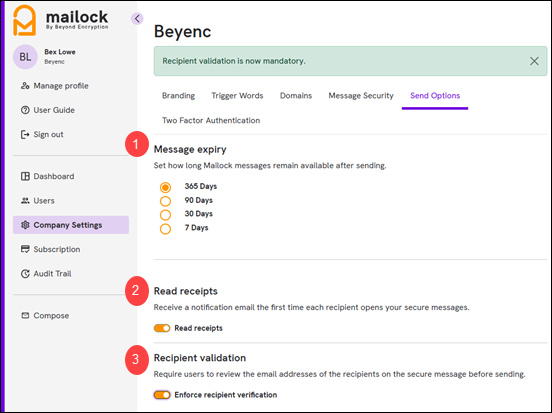
1. Message Expiry
If you hold a pro licence, you have the option to set an expiration date for your messages, ranging from 7 to 365 days. Simply select the number of days you require and this setting will apply to your entire company. This feature provides recipients with a specified timeframe to open and access their messages before they expire. Read more about Message Expiry.
2. Read Receipts
Upon sending an email to your recipient, you have the option to receive an email notification confirming the message has been opened. To enable or disable this feature, simply use the toggle button: slide to the right to turn on notifications or to the left to turn them off. This setting will apply to read receipt notifications for your entire organisation. Read more about Read Receipts.
3. Recipient Validation
Adds a recipient validation screen when sending, prompting users to confirm they are addressing their email to the correct recipients. To enable or disable this feature, simply use the toggle button: slide to the right to turn on or to the left to turn off. This setting will apply to your entire organisation. Read more about Recipient Validation.
Note: Only users designated as company owner or company administrator are permitted access to the portal.