Features > Tracking
Message tracking
Trace your secure emails with ease
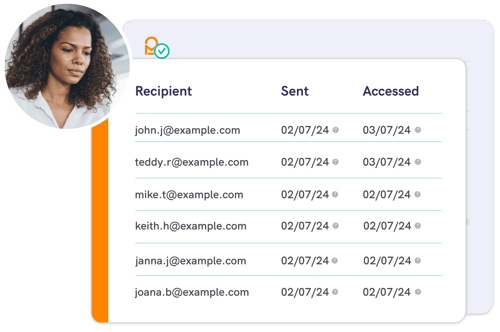
Mailock’s message tracking helps you stay in control of your secure emails.
Whether you’re using the 'Sent Items' menu in the Mailock web app or our Windows Outlook add-in, you’ll have a clear view of all your communications, making it easy to track your secure email activity.
Message details
For every email you send, you’ll see key details at a glance - who it was sent to, the subject, when it was sent, and whether its protected content was accessed.
You can search and filter emails by recipient, subject, or date to check their status for compliance or business insights.
Security tracking
Mailock makes it simple to manage sensitive information.
These tools provide insights into email activity - such as sends, content access, and revokes - so you can monitor usage with confidence.
Enterprise BI/MI
Mailock’s API and webhooks give you even more flexibility, letting you integrate secure email into your existing systems effortlessly.
.png?width=1082&height=700&name=Buiness%20team%20looking%20at%20laptop%20and%20smiling%20around%20board%20table%20(1).png)
Plans & pricing
View plans
Explore our pricing plans to find the right solution for your secure communication needs.

Building a Business Case for Secure Email: Risk, Cost-to-Serve, & Trust
Build a business case for secure email that links risk reduction, lower cost-to-serve, and stronger customer trust, with practical measures for regulated teams.

Improving Customer Journeys in Regulated Industries: A Behavioural Approach
Discover how financial firms can improve digital customer journeys using behavioural insights to drive better financial decisions and experiences.
Cybersecurity In Pensions: Breaking Down The Regulatory Guidance
Learn about the latest regulatory updates, the rising threats in the industry, and best practices for pension schemes to enhance their cyber resilience.