
Building a Business Case for Secure Email: Risk, Cost-to-Serve, & Trust
 Sam Kendall


Email is one of the primary channels where your customers read, react, and reply - and it’s one of the easiest places for sensitive data to leak.
But if you want your secure email project to land with your board, the story has to go beyond “we’ll be safer”.
It needs to show how encrypted, well-governed email reduces exposure, cuts cost-to-serve, and strengthens customer trust across the journeys that matter most.
You need a business case that matches how modern organisations are measured.
Contents
- The Three Columns of a Secure Email Business Case
- Risk: Reduce the Likelihood and Impact of Email Incidents
- Cost-to-Serve: Remove Expensive Friction
- Trust: Make Secure Communication Feel Normal
- How to Build a Business Case That Stands Up to Scrutiny
- What This Looks Like in Mailock
The Three Columns of a Secure Email Business Case
A secure email programme earns its place when it improves outcomes across three columns.
| Column | What It Protects | What You Can Measure | Secure Email Controls |
|---|---|---|---|
| Risk | Data, reputation, regulatory exposure | Incidents, near misses, time to contain, proof of delivery | Encryption, recipient authentication, message revoke, Message Tracker |
| Cost-to-Serve | Operating margin and capacity | Cost per document, avoidable calls, print and post volume | Digital delivery, secure replies, automation, self-serve access |
| Trust | Engagement and retention | Open rates, response rates, completion times, complaint drivers | Inbox-first delivery, low-friction access, branded experience |
The most effective programmes usually start with the highest-risk communications.
Then they expand into high-volume journeys where the cost-to-serve impact is greatest.
Risk: Reduce the Likelihood and Impact of Email Incidents
Email was never designed to be secure.
But people and organisations still rely on it to exchange sensitive information.
Assume Sensitive Data Will Be Sent “In the Clear”
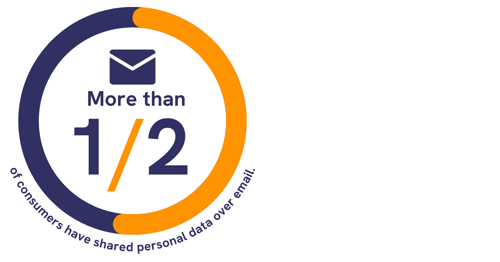
Our 2023 UK consumer research found that more than half of UK adults have shared personal data by email.
Training alone rarely changes behaviour under time pressure.
Technology and processes need to support secure communications for habits to stick.
The safe path should be the easiest path, so teams default to protecting data when the message contains personal, financial, or otherwise sensitive information.
What UK Consumer Research Found
More than half of UK adults in our 2023 consumer research have shared personal data by email, which widens the case for making secure sending the default.
The chart below summarises the scale of that behaviour gap.
Protect Against Interception and Inbox Takeover
Unencrypted emails sent “in the clear” can be intercepted in transit.
And even when a service uses encryption, messages can still be accessed if an attacker gains entry to a recipient’s inbox.
Secure email can help address both risks by encrypting content and applying recipient authentication where the risk warrants it.
This is crucial when the data you are sending could be used for fraud, identity theft, or customer harm.
Make Misdirected Emails Containable
We all make mistakes under pressure - “reply all”, misaddressed messages, and wrong attachments are common ways it goes wrong.
These mistakes create risk and operational workload: you need to investigate, contain, notify where required, and evidence what happened.
Controls like recipient authentication and message revoke reduce the chance the wrong person can access the content.
They can also support containment if a mistake does happen.
Evidence Delivery for Oversight and Compliance
For regulated organisations, it's rarely enough to say “we sent it”.
You need to prove delivery and access, keep accurate records, and support regulatory oversight.
Across regulated industries, the expectations tend to be consistent: encrypt sensitive data, authenticate recipients where appropriate, and record delivery in line with the rules that apply to your business, including digital-by-default requirements and, for FCA-regulated firms, Consumer Duty expectations around clear communications.
"Security is fundamental to the Mailock system, and always comes first - but evidence of secure delivery is also paramount."
Michael Wakefield, CTO, Beyond Encryption (Mailock)
Those controls matter most when the business case has to stand up in operations and audit conversations.
Cost-to-Serve: Remove Expensive Friction
The greatest savings from secure email are often in print rooms, contact centres, and portal support queues.
Reduce Print, Pack, and Post for High-Volume Communications
Print and post still plays a role in some journeys, but it can be both expensive and slow at scale.
In Project Rome research with Professor Simon Pringle, we estimated that for organisations where secure email could replace paper delivery, it can reduce print, pack, and post costs by up to 95%.
Digitalising can also reduce rework, returned mail, manual handling, and customer follow-up when documents arrive late or not at all.
Lower Avoidable Support from Portal Fatigue
Portals can be useful, but they can also create friction and support calls.
In portal login research with UK adults, we found that the average person has 119 digital accounts, and 20% reset logins weekly.
That friction drives password reset requests, abandoned journeys, and avoidable calls.
Secure email can support a hybrid approach - deliver sensitive documents to the inbox securely, and use portals where they add genuine value, rather than as the default delivery mechanism.

That pattern is one reason many teams look for a lighter delivery route for one-off sensitive documents.
Speed Up Document Loops with Secure Replies
“Please reply with…” is one of the most common sources of risk and delay in customer operations.
It is also where customers are often asked to send sensitive information back without adequate protection.
A secure reply mechanism can reduce that friction by letting recipients respond securely within the same protected thread.
This can reduce cycle times for statements, forms, evidence requests, and service workflows.
Trust: Make Secure Communication Feel Normal
The trust impact of secure communications can show up in better engagement, reduced complaints, higher process completion rates, and stronger retention.
Deliver Where Customers Respond
Another click is another point of friction.
If you can deliver sensitive documents or information directly to inboxes, you keep the experience familiar and straightforward.
We often see open rates over 75% when delivering secure communications to customers’ inboxes with Mailock, depending on audience and journey.
For many teams, that is the difference between the right messages being acted on or being ignored.
"Board conversations improve when secure email is framed in the same language as the rest of the business case: containable risk, lower cost-to-serve on repeat journeys, and delivery evidence you can stand behind."
Paul Holland, Founder and CEO, Beyond Encryption (Mailock)
That framing also shapes how teams present safeguards in day-to-day customer communications.
Support Clear, Customer-Friendly Communications
Secure email works when it feels like normal email - with the right safeguards added to help protect sensitive content.
This ease-of-use matters for organisations focused on customer outcomes, including expectations around understandable communications and avoiding foreseeable harm.
Paul Holland, Founder and CEO, Beyond Encryption (Mailock)
Visible safeguards only build trust when customers can use them without extra friction.
Build Confidence Through Visible Safeguards
Customers can tell when organisations take data protection seriously.
Encryption and identity checks become trust signals when they're implemented in a low-friction way.
It's important to protect privacy without pushing customers into complicated workarounds, or forcing them to create yet another secure portal account they will only use once.
How to Build a Business Case That Stands Up to Scrutiny
A strong business case is specific, measurable, and staged.
It avoids single-scope “security ROI” claims by tying benefits to multiple operational baselines.
Step 1: Define the High-Risk Communication Set
Start with the messages that contain the most sensitive information, and the highest customer harm if exposed.
Common examples include personal identifiers, financial documents, account changes, and regulated disclosures.
Step 2: Baseline Today’s Cost-to-Serve
Pull a simple baseline from the last 3-6 months.
Focus on volumes and unit costs you already track.
- Print and post volume (letters per month) x fully loaded cost per letter.
- Portal support (password resets, access issues) x average handle time x cost per minute.
- Document loops (requests to customers) x average days to complete x rework rate.
If you don't have perfect data, use conservative ranges, and document assumptions.
Finance teams tend to trust “directionally correct and defensible” more than “precise and fragile”.
Step 3: Map Controls to Outcomes
Make a clear link between the control and the outcome you expect.
For example, recipient authentication reduces the chance that a misdirected message can be accessed.
Message revoke supports containment if a mistake happens.
Message tracking and audit trails can support evidencing delivery and access.
A secure reply capability reduces back-and-forth friction and helps protect customers when they respond with sensitive information.
Step 4: Stage Rollout to Reduce Change Risk
Start with a focused set of teams and journeys, prove adoption, and then scale into high-volume delivery.
If you are ready to model rollout on a live platform, the Mailock section below maps each control to the three business case columns.
What This Looks Like in Mailock
Mailock is designed to help protect sensitive emails while keeping the customer experience straightforward.
It supports security controls and evidence features that map directly to the business case columns above.
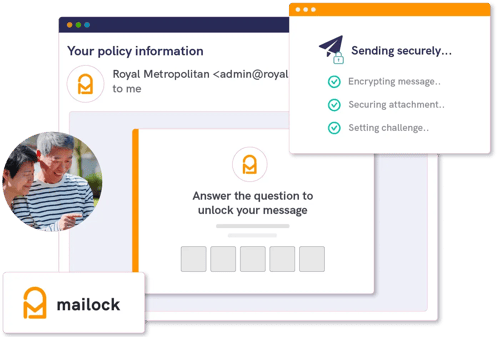
The controls below map directly to the risk, cost-to-serve, and trust columns in the business case.
Message-Level Encryption That Helps Protect Content
Mailock uses AES-256 (Advanced Encryption Standard) encryption.
Each email is protected with its own unique encryption key.
This helps reduce exposure if a message is intercepted, or if someone gains access to an inbox.
Read more about encryption.
Recipient Authentication for High-Risk Messages
Recipient challenges can include SMS codes and security questions, plus Unipass ID sign-in for one-click access in financial services contexts.
The aim is to help ensure only the intended recipient can access the message.
Read more about authentication.
Message Revoke and Message Tracker for Control and Evidence
Message revoke supports containment when something is sent in error.
Message Tracker provides visibility into sends, content access, and revokes, with searching and filtering that supports operational insight and compliance needs.
Read more about message tracking.
Secure Replies to Reduce Friction and Protect Customers
A secure reply mechanism lets recipients respond within the protection of a secure thread, without even needing to create an account.
This helps protect sensitive data during the back-and-forth that drives so many customer and client workflows.
Read more about secure replies.
Scaled Options for Teams and High-Volume Delivery
Mailock supports different deployment patterns depending on the use case.
That includes desktop and web workflows for teams, policy-based protection at scale via the Mailock Secure Email Gateway (SEG), and automated encryption using rules and X-headers for high-volume delivery.
Read more about automation.
Summary and Takeaway
A secure email business case holds up best when it links controls to measurable outcomes.
A strong case ties better security to fewer incidents, lower operational friction, and clearer evidence when you need it.
- Start with the highest-risk messages and teams under pressure.
- Baseline cost-to-serve using numbers your finance team already trusts.
- Stage rollout so adoption stays predictable, and change risk stays low.
Make sure the safest way to send and receive sensitive information is also the easiest way to get work done.
FAQs
What Measures Make a Secure Email Business Case Stronger?
Use measures that connect risk reduction, lower cost-to-serve, customer adoption, incident handling, and evidence quality.
How Do Risk, Cost-to-Serve, and Trust Connect?
A better secure email workflow can reduce avoidable incidents, remove manual friction, and make protected communication feel normal to customers.
Where Should Teams Start Building Evidence?
Start with high-volume or high-risk journeys where sensitive documents are sent often and existing process costs are visible.
References
Are UK Consumers Not Taking Email Security Seriously? (2023 Research), Beyond Encryption, 2023
High Volume of Confidential Post Use Case, Beyond Encryption
UK Consumers Have 119 Logins & Digital Accounts, Beyond Encryption, 2026
A Guide to Data Security: Encryption, ICO, 2026
Personal Data Breaches: A Guide, ICO, 2026
Consumer Duty: Implementation Good Practice and Areas for Improvement, FCA, 2026
Reviewed by
Sam Kendall, 29.05.26
This content is for general information only and is not legal advice.
|
Originally posted on 19 03 26
Sam Kendall works on digital marketing at Beyond Encryption, helping build B2B marketing activity around research, first principles, and sustainable growth. He writes about marketing effectiveness, positioning, customer communications, and digital culture, with longer-form work published at ATNL.net. |
Email Series
Subscribe to
.svg)
Subscribe to Privacy Decoded, our monthly email briefing about privacy, digital trust, and the forces shaping our online world.
 Previous post