Features > Revoke
Message revoke
Easily restrict access to sent emails
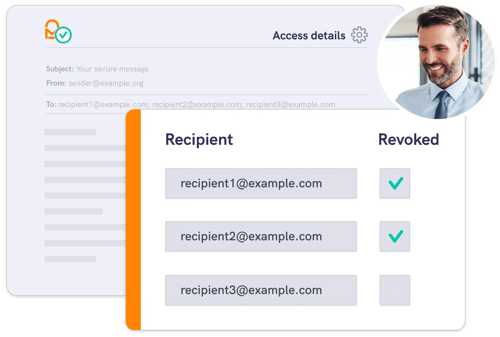
With Mailock’s message revoke feature, you can close future access to protected emails, helping keep your sensitive information protected - even if sent in error.
If you’ve sent an email to the wrong person or included the wrong attachment, you can close future access to it using message revoke.
Message revoke helps you comply with regulatory requirements and reduce data exposure if a breach occurs.
Desktop access management
Revoke access to one or multiple emails - it’s your choice.
Using either the Outlook add-in or the Mailock web app, you can quickly take back control of secure messages and protect your information.
Comprehensive oversight
Mailock Enterprise admins can manage email access across the organisation, adding an extra layer of reassurance in line with your company’s security policies.
Revocation can also be managed through the Mailock API.
.png?width=1082&height=700&name=Buiness%20team%20looking%20at%20laptop%20and%20smiling%20around%20board%20table%20(1).png)
Plans & pricing
Compare plans
Explore our pricing plans to find the right solution for your customer communication needs.

The Hidden Risk in Your Business: Email Autofill
Email autofill can send sensitive messages to the wrong person. Learn the risks, practical fixes, and how recipient authentication helps reduce mistakes.

Building a Business Case for Secure Email: Risk, Cost-to-Serve, & Trust
Build a business case for secure email that links risk reduction, lower cost-to-serve, and stronger customer trust, with practical measures for regulated teams.
.png?width=600&height=400&name=Presenting%20cyber%20data%20to%20the%20team%20(2).png)
What the UK Cyber Breaches Survey Tells us About Risk & Resilience
Learn what the UK Cyber Breaches Survey 2024 reveals about cyber crime, phishing, fraud, and practical cybersecurity risk management for UK businesses.