.png?)
How Can I Tell if My Email Has Been Read?
 Sabrina McClune


Sending an important email and not getting a response can be frustrating.
You might find yourself wondering if your message was buried under a flood of emails or simply overlooked altogether.
While there’s no guaranteed method to confirm an email was read, several approaches might help shed light on what happened.
Contents
- Requesting a Read Receipt
- Limitations of Read Receipts
- Email Tracking Solutions
- Secure Email Solutions
- When Email Tracking Matters
Requesting a Read Receipt
A go-to option for many people who want to check if an email was opened is to request a read receipt.
This built-in feature is available in many email platforms and, when supported by the recipient’s settings, it lets you know when your message has been viewed - though it’s far from foolproof.
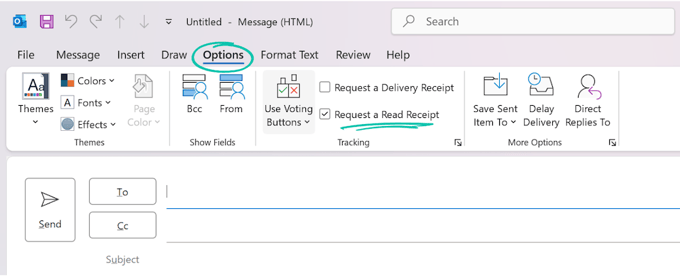
Requesting a Read Receipt in Outlook
Here’s how to do it in Outlook:
- Create a new message.
- Go to the 'Options' tab.
- Look under 'Tracking' and tick the 'Request a Read Receipt' box.
- Send your email as normal.
Just keep in mind: many recipients won’t send the confirmation, either by choice or due to settings that block it entirely.
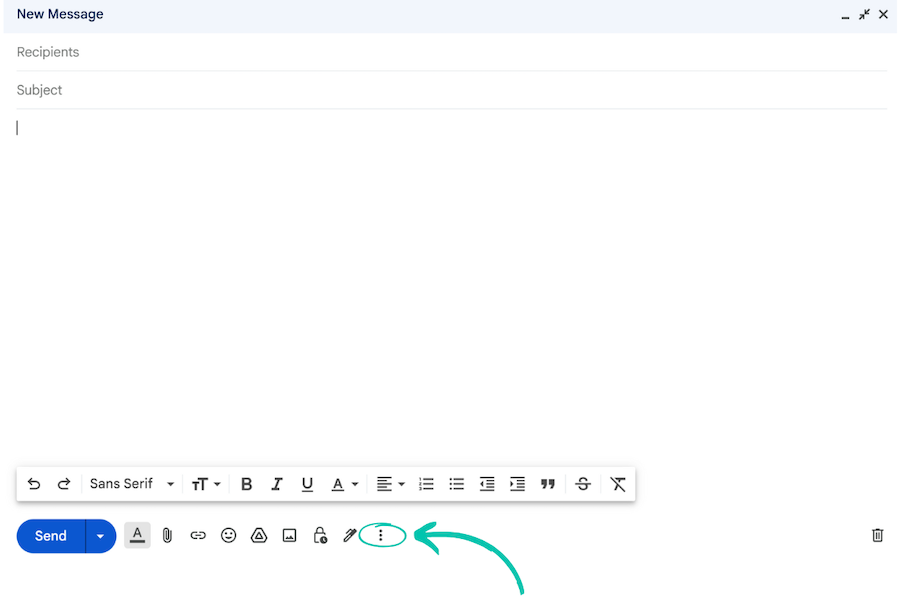
Requesting a Read Receipt in Gmail
To give it a try in Gmail:
- Open Gmail and click 'Compose'.
- Click the three-dot icon ('More options') in the lower-right corner.
- Choose 'Request read receipt'.
- Finish writing and click 'Send.'
Whether you get a confirmation depends on the type of Gmail account and the recipient’s settings - so it’s not always predictable.
Note: Some Gmail features, like read receipts, are limited to certain account types such as Google Workspace.
Limitations of Read Receipts
Read receipts can be helpful - but only in ideal conditions.
Here’s why they’re not always reliable:
- Privacy defaults: Many email programs block read receipts by default.
- Recipient control: People can decline to send them, even if they read your email.
- Limited confirmation: These tools only show an email was opened - not whether it was understood or taken seriously.
In other words, even if you enable a read receipt, you’re still relying on the recipient’s software (and goodwill).
Read receipts can work, but they are not always reliable and require cooperation from the recipient.
When you need more certainty than a receipt prompt, tracking tools and secure email platforms are the usual next step.
Email Tracking Solutions
For better insights, many turn to email tracking extensions or software.
These tools use a clever trick: they embed a tiny invisible image in your email. When that image is loaded, it signals that the email was opened.
This relies on images being loaded, and privacy settings can reduce accuracy.
It’s not perfect, but it can work better than relying on read receipts alone.
Here are some leading tools in this space:
- Mailtrack: Great for Gmail users. You get instant notifications and a simple interface, even with the free version.
- SalesHandy: Unlimited tracking and quick alerts - plus Outlook integration on premium plans.
- Gmelius: Ideal for teams, with tools for scheduling, collaboration, and task tracking.
- Streak: Combines CRM features with tracking for Gmail. Great for sales pipelines.
- Mixmax: Includes reminders and integrations (like Salesforce), with built-in tracking.
If you’re comfortable editing HTML, you can even add a tracking pixel manually - though it’s a bit more technical.
Advantages of Email Tracking Extensions
Email tracking tools have their perks:
- They can work without the recipient actively sending a receipt, but recipient privacy settings may still limit accuracy.
- They can track opens without prompting the recipient in most cases.
- Some go beyond opens, suggesting when an email was viewed and limited location signals (where available).
- They may help you spot unusual opens that can indicate forwarding (but this isn’t definitive).
Still, they’re not magic - they tell you your email showed up, not whether it made an impression.
What The Research Shows
Privacy changes by Apple, Google, and Yahoo make email tracking more challenging for senders who rely on open pixels alone.
If you depend on open rates for sales or marketing decisions, treat tracking signals as directional rather than definitive.
|
Email Tracking Update: Due to recent privacy enhancements from major providers like Apple and Google, tracking accuracy may be reduced. Gmail and Yahoo Mail deliverability updates in 2024 also changed how senders should think about engagement signals. In high-sensitivity scenarios, consider using a solution like Mailock. |
Secure Email Solutions
When stakes are high - like sending confidential or regulated information - a secure email platform is often the better choice.
These tools focus on privacy and accountability:
- End-to-End Encryption: Helps protect your message from the time it leaves your inbox until it reaches your recipient.
- Insightful Tracking: See when your email is opened, how many times, and in some cases general access details (where available).
- Identity Verification: Helps make sure the person opening your message is the intended recipient - often through extra authentication.
Secure email gives both sender and recipient clearer accountability when a message has been opened and who accessed it.
"Secure email solutions can enhance data protection and provide tracking insights for important messages."
Paul Holland, Founder and CEO, Beyond Encryption (Mailock)
These services often come with subscription fees, but some cater to occasional users as well.
Take Mailock, for instance - it offers a free tier for occasional secure sends with secure reply functionality.
Need more robust options for regular use?
Explore our recommendations for the top secure email services for businesses.
Secure email solutions can offer encryption, detailed tracking, and recipient verification when standard inbox tools are not enough.
That combination is most useful when the message itself is sensitive, time-bound, or part of a regulated workflow.
When Email Tracking Matters Most
In everyday conversations with friends or family, tracking whether an email was opened usually doesn’t matter much.
But in a professional setting, even small signals - like knowing when your email was read - can help shape next steps. Consider these real-world examples:
- Sales: If a potential client opens your message, that might be your best cue to follow up while you’re still top of mind.
- Email Marketing: Open tracking helps you measure what’s working - and what isn’t - in subject lines and timing.
- Compliance: In sectors like finance or healthcare, confirming that someone received and opened a message may be part of your obligations.
- Networking: Following up on a job lead or pitch? Knowing the email was read can help you avoid awkward guesswork.
"In financial services, secure and trackable communication is crucial."
Adam Byford, COO, Beyond Encryption (Mailock)
Tracking has its place - but it should never be used to pressure or pry. Respecting others’ digital boundaries is just as important as getting your message across.
If tracking confirms an open but the thread still goes quiet, the next step is a follow-up plan that respects the recipient’s time.
What to Do If You Receive No Response?
It’s frustrating - you see your message was opened, but days go by and there’s no reply. What next?
Here’s how to follow up without overstepping:
- Give it time: Wait 3-5 business days. They might be swamped or out of office.
- Send a gentle reminder: Reference your earlier message and ask if they’ve had a chance to consider it.
- Try another channel: If it’s time-sensitive, a call or message on LinkedIn might be more effective.
- Don’t overdo it: Repeated nudges can come off as pushy - one or two follow-ups is usually plenty.
Now, if the email wasn’t even opened?
- Make sure the address is correct - a typo can derail everything.
- Check your own sent folder for formatting or spam triggers.
- Resend the message with a subject line that might stand out better.
- If all else fails, consider reaching out through an alternative route.
At the end of the day, email is just one way to connect - and it doesn’t always give you the full picture.
To Track or Not to Track?
If you’re sending emails for marketing, sales, or project updates, tracking tools can help you stay informed and plan better follow-ups.
That said, no system is perfect. Emails can be opened and ignored. Privacy settings can block your tools. And in sensitive contexts, tracking can do more harm than good.
When trust and security matter most, a secure email platform - with verifiable tracking - is the better route.
Tracking works best when you use it to time follow-ups and confirm delivery, not to pressure recipients.
FAQs
Can You Tell if an Email Has Been Read without a Read Receipt?
Yes - with email tracking tools like Mailtrack, you can often get a notification when your message was opened. But don’t forget: privacy features may block this.
How Do I Request a Read Receipt in Outlook or Gmail?
In Outlook, head to the 'Options' tab when composing, then check 'Request a Read Receipt.'
In Gmail, click the three-dot menu in the compose window and select 'Request read receipt.'
Does the Sender Know if You Decline a Read Receipt?
No. If the recipient declines, the sender usually won’t receive any notice - it’s as if the feature wasn’t used at all.
Is There a Tool to See if an Email Was Opened?
Yes - platforms like Streak, Mixmax, and SalesHandy are built for this. They’ll notify you when an email is opened, as long as tracking isn’t blocked.
How Can You Tell if Someone Read Your Email on an Iphone?
If read receipts are enabled or the iPhone’s settings don’t block trackers, you may get a notification. But iOS privacy features can limit accuracy.
Why Do Read Receipts Not Always Work?
It often comes down to privacy settings. Some email apps block them entirely, or ask the recipient to opt in - which many people choose not to do.
References
Add and Request Read Receipts and Delivery Notifications in Outlook, Microsoft Support, 2024
Request a Read Receipt, Gmail Help, 2024
The Best Email Tracking Software, Kinsta, 2024
How Apple’s Mail Privacy Protection Impacts Email Marketing, Constant Contact, 2024
Guide to 2024 Email Deliverability Updates, Braze, 2024
Reviewed by
Sam Kendall, 31.05.26
Sabrina McClune, 12.06.24
This content is for general information only and is not legal advice.
|
Originally posted on 12 06 24
Sabrina McClune writes about cybersecurity, data protection, digital identity, and digital transformation for Beyond Encryption, helping regulated sectors understand complex technology and compliance topics with greater clarity. |
Email Series
Subscribe to
.svg)
Subscribe to Privacy Decoded, our monthly email briefing about privacy, digital trust, and the forces shaping our online world.
 Previous post