-1.png?)
What Is an Email Encryption Gateway?
 Sam Kendall


An email encryption gateway is an essential tool for securing a business’ enterprise email communications.
It makes sure sensitive information is protected from unauthorised access by encrypting it before it is sent to external recipients.
By adding encryption, integration with existing mail flows, and compliance support, email encryption gateways help businesses safeguard data and build trust with clients and partners.
Email encryption gateways are a key component of a strong outbound email security strategy.
They are used to encrypt emails between your organisation and external parties, protecting the confidentiality and integrity of message content as it passes over unencrypted channels.
Many organisations struggle to secure email communications at scale, especially when staff send sensitive documents to clients, partners, and remote workers.
Email encryption gateways offer a practical way to add protection without replacing the email tools people already use every day.
As well as providing email security, encryption gateways help with regulatory compliance, making sure that sensitive information isn't leaked during transmission or stored without appropriate protection.
Email encryption gateways help protect sensitive information in email messages from unauthorised access.
Some email encryption gateways are hosted on-premise and managed by internal company administrators.
Other gateway solution providers offer a fully managed service run on cloud-based technology.
Email encryption gateways should integrate with existing email systems, enhancing security without disrupting everyday email usage.
They are adaptable to various email platforms, maintaining user experience while adding a layer of protection.
Gateways should include strong encryption protocols and recipient verification processes, making sure that sensitive information remains confidential and is accessible only to the intended recipients.
It’s important to consider that some email encryption gateways might introduce a degree of user inconvenience.
Recipients who are not familiar with the chosen encryption solution might need to take additional steps to access encrypted emails.
Additionally, compatibility issues can arise if recipients lack compatible software to decrypt messages.
Research shows ease of use is incredibly important when selecting an email encryption solution, to experience and security.
Inbound vs. Outbound
Email encryption gateways can play two different functions, addressing both common user concerns and specific needs.
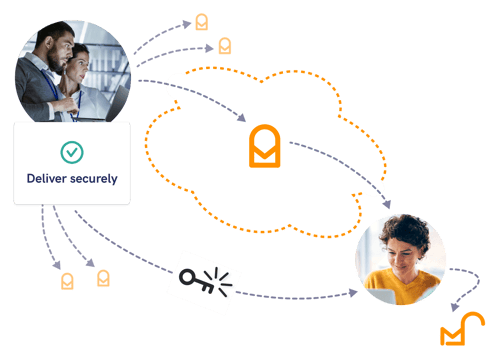
Outbound email encryption gateways encrypt communications on delivery, securing messages sent to anyone outside your security infrastructure.
This can include customers, partners, vendors, or staff working remotely.
When you send an email to someone outside your company infrastructure, only the intended recipient should be able to decrypt it.
This makes sure that sensitive information is protected from falling into the wrong hands.
Inbound email encryption gateways can:
- Keep incoming encrypted emails secure; making sure they stay protected until the intended recipient accesses them.
- Decrypt incoming encrypted emails so that the intended recipients can read them and download any attachments.
.png?width=650&height=325&name=Encryption%20disguises%20the%20contents%20of%20your%20email%2c%20transforming%20messages%20and%20attachments%20into%20a%20code%20that%20cannot%20be%20read%20by%20human%20eyes.%20(1).png)
In many cases, organisations will configure their inbound email encryption gateway to only allow emails from certain senders using a whitelist.
This gives administrators control over the emails that enter their company's infrastructure and helps to reduce email phishing.
"A gateway gives administrators a control point for encrypted traffic, but outbound rules still need to trigger protection before sensitive content leaves the organisation."
Michael Wakefield, CTO, Beyond Encryption (Mailock)
On-Premise vs. Cloud
Companies can choose to host email encryption gateway software on their server or their gateway vendor's server.
Each option offers distinct advantages based on user needs.
On-premise deployments grant organisations complete control over their infrastructure, making them ideal for businesses with stringent regulatory requirements or data sovereignty concerns.
This ensures compliance and allows businesses to manage data entirely within their own environments.
Cloud deployments, on the other hand, are often chosen for scalability and efficiency.
They are especially suited for businesses looking to minimise overhead costs and benefit from provider-managed infrastructure and ongoing updates.
Cloud solutions can also be more adaptable for organisations experiencing rapid growth.
Regardless of the deployment type, most gateway vendors offer or support integrations with major mail exchange servers including Exchange, Office 365, G Suite, and IBM Domino.
"Email encryption helps firms meet compliance expectations and gives clients a clearer signal that sensitive communications are handled with care."
Paul Holland, Founder and CEO, Beyond Encryption (Mailock)
There are several well-regarded secure email services on the market.
Consider factors like budget, deployment needs (cloud vs. on-premise), ease of use, and integrations with your existing email infrastructure when making a selection.
If you choose the right email encryption gateway, it should be able to handle high volumes of emails without sacrificing performance, making it suitable for businesses as they grow their customer base.
Does Microsoft 365 Provide an Email Encryption Gateway?
Microsoft 365 does not offer a dedicated email encryption gateway, though it is able to encrypt outbound and decrypt inbound encrypted messages in a limited capacity.
Emails encrypted using Microsoft 365's native email encryption, Microsoft Purview Message Encryption, can be read directly in supported Outlook clients, while other mail services receive instructions for opening the protected message.
However, the recipient experience and available controls depend on licence, tenant configuration, policy setup, and the recipient's email client.
Microsoft also treats revoke as conditional: Advanced Message Encryption can revoke eligible link-based, branded encrypted emails, but not messages delivered through the native inline experience in supported Outlook clients.
Learn more about Microsoft 365's secure email capability.
Email Encryption Gateways: A Vital Defence for Data
Email encryption gateways help organisations protect sensitive data, reduce exposure from misdirected or intercepted messages, and support compliance expectations.
They are a practical investment for teams that need to send confidential information to clients, partners, and remote staff by email.
FAQs
What Is an Email Encryption Gateway?
An email encryption gateway is a tool that encrypts and decrypts email communications to secure sensitive information.
How Does an Email Encryption Gateway Work?
The gateway encrypts email content before it is sent to recipients and makes sure that only authorised recipients can decrypt it.
What Are the Benefits of Using Email Encryption Gateways?
They enhance email security, ensure regulatory compliance, and protect sensitive information during transmission.
What Should I Look for in an Email Encryption Gateway?
When choosing an email encryption gateway, consider factors like ease of integration with existing systems, compliance with relevant regulations, the strength of encryption protocols, scalability, and user-friendliness.
You should also evaluate the provider’s customer support and the cost-effectiveness of their solution.
References
Usability of End-to-End Encryption in E-Mail Communication, Frontiers in Big Data, 2021
Send S/MIME or Microsoft Purview Encrypted Emails in Outlook, Microsoft Support, 2026
Revoke Email Encrypted by Advanced Message Encryption, Microsoft Learn, 2026
Reviewed by
Sam Kendall, 02.06.26
This content is for general information only and is not legal advice.
|
Originally posted on 15 11 22
Sam Kendall works on digital marketing at Beyond Encryption, helping build B2B marketing activity around research, first principles, and sustainable growth. He writes about marketing effectiveness, positioning, customer communications, and digital culture, with longer-form work published at ATNL. |
Email Series
Subscribe to
.svg)
Subscribe to Privacy Decoded, our monthly email briefing about privacy, digital trust, and the forces shaping our online world.
 Previous post