
Human Error and Outbound Email Security: Risks & Solutions
 Sam Kendall


Most email incidents start with a simple human mistake: the wrong recipient, the wrong attachment, or a reply-all sent too quickly.
You can reduce these errors by adding safeguards at the point of send - prompts, automated encryption, recipient checks, and the ability to cut off access if something goes wrong.
Email mistakes tend to fall into a small set of patterns.
Once you understand the common errors, you can map them to practical controls - for example, send-time prompts, encryption, recipient authentication, and tracking and revoke - to reduce both the chance of a slip and the impact if one happens.
This guide explains why email mistakes happen, what they can cost, and steps you can take to reduce incidents.
Contents
- What Human Error Actually Means
- Why Mistakes Happen at Work
- Why Email Magnifies Risk
- What One Mistake Can Cost
- A Prevention Framework
- Simple Changes You Can Implement This Week
- Reviewing Solutions? Look at What Matters
Human Error in Email: What It Actually Means
When people talk about human error and email security, it can be tempting to think the risks can be solved by "being more careful."
In reality, most incidents are predictable slips in familiar conditions: high volume, constant switching, and little time to think.
Mistakes are normal.
The key point is that mistakes are only as inevitable as we allow them to be. The systems we build can account for this and make safe behaviour easy - even on the busiest days.
The Email Mistakes That Keep Reappearing
Most organisations see the same patterns, because the way people work, and the way email works, is fairly consistent.
- Wrong recipient: autocomplete selects the wrong “James”, or an outdated list includes someone who no longer needs access.
- Reply all: internal context or sensitive details are distributed wider than intended.
- Wrong attachment: similar filenames, older versions, or files from another case get attached in a rush - sometimes with hidden tabs, tracked changes, or metadata still inside.
- CC instead of BCC: recipient addresses are exposed in bulk messages to many other recipients.
- Forwarding or copying into the wrong channel: content is moved into personal inboxes or non-approved tools to work around barriers in the corporate email setup.
.png?width=1600&height=900&name=Copy%20of%20Durable%20medium%20digital-by-default%20(MiFID%20retail%20disclosures).png)
Download this in a high resolution PDF format.
Why Mistakes Happen at Work
People don't make errors because they don't care.
They make errors because modern work (and life) encourages speed and context switching, and native email gives you very few “pause and confirm” moments.
Research suggests it can take about 23 minutes to get back on task after an interruption - which helps explain why “quick sends” are where mistakes show up.
Cognitive Load Makes “Double Checking” Disappear
When teams are overloaded, the brain uses shortcuts to keep work moving.
Those shortcuts are useful for productivity, but can be risky for confidentiality, especially when recipients and attachments are only one click away.
In practice, “I’ll double-check” is the first step that gets skipped when the inbox is full.
Ambiguity Drives Workarounds
If the “approved way” to send sensitive information is unclear, slow, or inconsistent, people will improvise.
Again, this is not for lack of care, it's people trying to get the job done.
Over time, those workarounds become normal, and the risk becomes an operational issue rather than a mistake in the moment.
Why Email Magnifies Risk
Email is fast, universal, and deeply embedded in workflows.
Ofcom has reported that 88% of UK online adults use an email service.
But it is also routinely used for information it wasn't designed to protect.
People Are Still Being Asked to Share Sensitive Data by Email
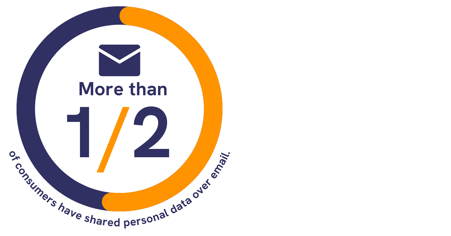
Our consumer research (2,000 UK adults, 17 - 20 February 2023) found that 73% of consumers have been asked by a business they deal with to share personal data over email.
We also found that 24% of UK adults say they have accidentally shared personal data with the wrong recipient via email.
Of those surveyed, 16% said this happened within the past three months.
That's too common to be an edge case. It also means many of these behaviours are predictable enough to put safeguards in place to reduce their impact.
Speed Features Reduce Friction in the Wrong Places
Autocomplete, threads, and mobile sending are great for responsiveness.
But they also remove the small pauses where people might otherwise spot the wrong name, a hidden CC field, or a mismatched attachment.
That is why many secure email solutions add lightweight prompts at the exact moment people are about to send - in context.
What An Email Mistake Can Cost
Some mistakes are contained quickly, and some can escalate.
The difference is usually what was sent, who can access it, how widely it spreads, and how fast the organisation can respond with clear steps.
Regulatory Exposure Starts With Simple Slips
Under the UK GDPR, organisations must assess the risk to people’s rights and freedoms after a personal data breach.
If the breach is likely to result in a risk, the ICO says you must report it within 72 hours of becoming aware of it (where feasible), and record what happened and your decisions in response.
If the breach is likely to result in a high risk, you must inform the affected people without undue delay.
This is not legal advice, but the guidance is clear: treat a mistakenly sent email as an incident until you have assessed the risk.
The Hidden Costs: Time, Rework, and Loss of Momentum
Even when an error is contained, teams can lose hours to triage, follow-ups, reissuing documents, and internal escalations.
This can have a knock-on effect, creating onboarding delays, payroll corrections, and approval bottlenecks elsewhere within the organisation.
Putting small barriers in the way of risky sends might feel inefficient, but it beats downtime that spreads through a team or company.
"Human error is predictable when people are overloaded.
If you want fewer email incidents, reduce the decision burden in the moment of sending, and back it up with simple, practised response steps."
Paul Holland, Founder and CEO, Beyond Encryption (Mailock)
That combination of send-time friction and response discipline is what the strongest prevention frameworks build on.
A Practical Prevention Framework: People, Process, and Protection
The most resilient organisations treat human error as a design input.
That means supporting staff with habits, workflows, and tools that hold up under pressure.
People: Train for Reality, Not Perfection
Training can be most effective when it is short, specific, consistent, and matched to real scenarios.
Focus on repeatable behaviours, such as checking the first and last recipient, confirming the attachment matches the subject, and pausing on any “urgent change” request that involves money or credentials.
Make it clear to staff that reporting a mistake quickly is actively encouraged and rewarded.
"The operational risk is not that people do not care. It is that everyday email gives them almost no pause at the point of send.
When a wrong attachment or recipient list goes out on a busy afternoon, the difference is usually whether the team has a practised playbook and tools that limit exposure fast."
Adam Byford, COO, Beyond Encryption (Mailock)
Training alone rarely covers every high-risk journey teams run each week.
Process: Standardise the High-Risk Journeys
Select a small number of workflows where email mistakes represent the greatest risk, then standardise them for consistency.
- External sends of personal data: define what personal data is involved, and what must be protected.
- Bulk communications: use templates, approvals, and clear rules for BCC and distribution lists (or a dedicated bulk-send secure email tool like Mailock).
- HR and payroll documents: standardise naming, version control, and attachment checks to reduce “wrong file” sends.
- Payment or bank detail changes: make verification steps non-negotiable - for example, confirm changes using a trusted channel (such as calling back on a known number) and use a second-person approval before anything is processed.
Where your email platform supports it, a short outbox hold (for example, 30 seconds) acts as an “undo send” window and can add a second chance without changing how people work.
Protection: Add Safeguards That Fit Normal Email Habits
A control that addresses email errors works best when it does two things: it helps people choose the safer option at send time, and it limits exposure if a message is sent in error.
Mailock is designed to help teams send sensitive communications securely by email, with encryption and recipient authentication layered onto everyday email workflows to help reduce unauthorised access.
To make secure sending practical day to day, any security controls you apply should map directly to common mistakes:
- Security alerts: surface prompts at the point of send when a message looks sensitive (for example, personal data or bank details) so staff are nudged into a safer journey.
- Automated encryption: rules that secure messages by default for defined journeys, so protection does not depend on memory or perfect attention.
- Recipient authentication: extra checks that make it harder for an unintended recipient to open a message if it was sent by mistake.
- Message revoke: the ability to remove access to a secure message if it was sent in error (where supported), reducing exposure.
- Tracking: visibility of delivery and opening activity, which helps incident responders address breaches with data instead of estimates.
- Secure replies: keeps the conversation protected end to end, so sensitive follow-ups don't drop back into standard email.
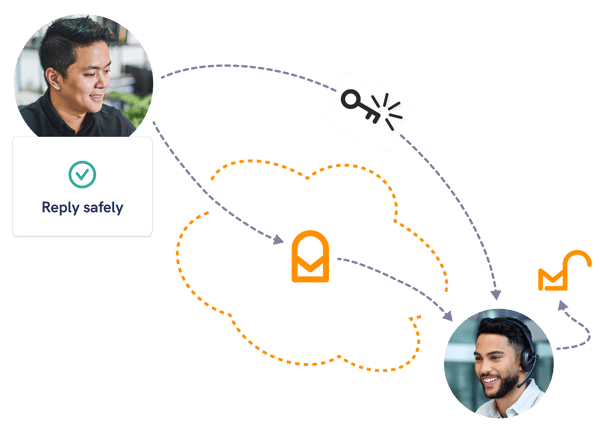
These controls are most useful when they match the mistakes your team sees most often.
Detection and Response: Make Mistakes Easier to Contain
No control prevents every incident, so your response needs to be routine.
Make sure your team can quickly answer three questions: what was sent, who can access it, and what you can do next.
Where you have it, use tracking and revoke capabilities to reduce exposure and capture a clear timeline for your incident log.
Clear escalation paths, documented steps, and the right visibility reduce time spent guessing when pressure is highest.
Simple Changes You Can Implement This Week
Here are some changes you can make this week to reduce your team's outbound email risk.
Reduce Wrong-Recipient Risk Without Adding Friction
- Directory hygiene: remove stale contacts and keep distribution lists current.
- External recipient cues: activate 'external sender' alerts, and tell staff to add external recipients last.
- Autocomplete control: for high-risk teams, limit auto-complete functions that can increase wrong-recipient sends.
- Attachment hygiene: agree simple rules for checking filenames and versions, and remove hidden data (tracked changes, hidden tabs, metadata) before sending.
- Shared mailbox discipline: standardise naming conventions, signatures, and sending rules, so it's clear to people what account they are in, if they have access to shared mailboxes.
Use Secure Email Controls by Default for Sensitive Sends
If you already have access to a secure email platform, the fastest win is making it normal for the journeys that create the most mistakes.
- Define your “secure by default” categories: HR documents, onboarding packs, ID evidence, bank details, medical information, or regulated customer communications.
- Switch on security alerts/nudges: use prompts or custom rules to nudge staff when messages look sensitive.
- Apply stronger access controls where relevant: apply recipient authentication for higher-risk sends, especially external recipients.
- Make containment practical: use tracking to confirm exposure and revoke access where available if a message is sent in error.
Create a Simple “Wrong Recipient” Playbook
A one-page playbook for 'what happens if things go wrong' can be the difference between a contained slip and a slow-moving incident.
For example, you could use a simple step-by-step procedure:
- Log and contain: start an incident log. If you are using secure email, check tracking and revoke access where possible. If you aren't, focus on limiting further sharing.
- Confirm exposure: what data was included, and who can realistically access it?
- Contact the recipient: request deletion, and record the response.
- Assess risk: consider likely impact to people’s rights and freedoms, then document your decision.
- Escalate early: involve your DPO (Data Protection Officer), security lead, or incident response owner straight away.
If you are comparing secure email options, the next section helps you focus on what matters most in practice.
Reviewing Solutions? Look at What Matters
Not every organisation needs the same controls.
But most organisations do need the same outcome: sensitive information reaches the right person, with minimal rework and fewer incidents.
Common Solutions - and the Pitfalls
| Approach | Strengths | Where Human Error Bites |
|---|---|---|
| Standard email + policies | Low friction, familiar, quick rollout | Relies heavily on perfect checking under pressure - mistakes are still inevitable |
| Portals for sensitive data | Strong control over access and storage | Workarounds appear when portals slow down everyday workflows and people resort to email |
| Secure email platform | Protects sensitive content while keeping email usable | If policies or alerts are not properly implemented, staff still guess what to protect and when. |
| Rule-based security | Central controls, policy enforcement, reporting | Exceptions can push staff to bypass controls if they have no access to apply security manually. |
Questions to Ask When You Compare Solutions
- Recipient assurance: can you add recipient authentication when it matters?
- Sender experience: does it fit normal working patterns, including busy periods?
- Recipient experience: will customers and colleagues use it without repeated chasing?
- Visibility: can you support incident response with tracking and clear status?
- Containment: can you revoke access if something is sent in error?
- Admin control: can you set policies by team, risk level, and use case?
If your objective is fewer incidents and fewer bottlenecks, prioritise the approach that reduces decisions for senders and removes uncertainty during response.
FAQs
What Does Human Error Mean in Email Security?
It covers everyday mistakes such as sending to the wrong person, opening suspicious links, or sharing information through the wrong channel.
Why Does Email Magnify Human Error?
Email is fast, familiar, and high volume, so small mistakes can expose sensitive information before anyone notices.
What Controls Reduce Human-Error Risk?
Combine clear process, staff training, recipient checks, encryption, authentication, and practical prompts at the point of sending.
References
Consumer Research, Beyond Encryption, 2023
Personal Data Breaches: A Guide, Information Commissioner’s Office, 2026
3 Ways to Bounce Back After a Work Interruption, Duke Today, 2021
Online Nation 2021 Report, Ofcom, 2021
Reviewed by
Sam Kendall, 01.06.26
This content is for general information only and is not legal advice.
|
Originally posted on 26 02 26
Sam Kendall works on digital marketing at Beyond Encryption, helping build B2B marketing activity around research, first principles, and sustainable growth. He writes about marketing effectiveness, positioning, customer communications, and digital culture, with longer-form work published at ATNL.net. |
Email Series
Subscribe to
.svg)
Subscribe to Privacy Decoded, our monthly email briefing about privacy, digital trust, and the forces shaping our online world.
 Previous post