
What Is a Passkey and Is It Safe?
 Sam Kendall


Seen “passkeys” pop up when signing into an app or website and wondered what they are - and whether you should be using them?
Passwords are still the most common way to sign in online, but they are often reused, easy to guess, and can be stolen.
Weak or stolen passwords still underpin many phishing and credential-stuffing attacks, which is one reason the NCSC is pushing passkey adoption across public and private services.
Passkeys are being introduced as a simpler, more secure alternative that could replace passwords while making logins more convenient.
What Is a Passkey?
A passkey is a way to log in without typing a password. Instead, it uses a pair of cryptographic keys to prove who you are, based on the Web Authentication standard.
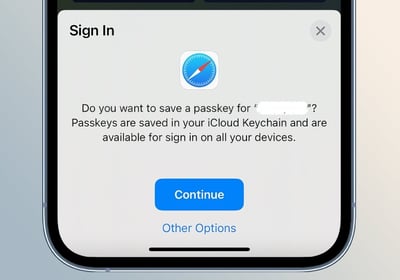
When you register with a service, your device creates two keys:
- Public key: stored by the service you are signing up to.
- Private key: stored securely on your device and never shared.
When you log in, the service sends a challenge to your device. Your device signs it with your private key and sends the signature back.
If the signature matches the stored public key, you are signed in - with no password or secret sent over the network.
Why Are Passkeys Gaining Ground?
In May 2025, the UK government announced it would roll out passkeys across GOV.UK services - including NHS and HMRC - as an alternative to SMS-based verification.
What The NCSC Announced
The NCSC said the NHS became one of the first government organisations in the world to offer passkeys to users, with wider GOV.UK rollout planned as SMS verification is phased out.
That shift addresses practical problems with SMS codes: they can be delayed by network issues and are costly for organisations to send at scale.
Where The Time Saving Comes From
The NCSC estimates passkeys can save roughly one minute per login compared with entering a username, password, and SMS code.
They also close off a major phishing pathway. Even if a user is tricked into visiting a fake site, the private key stays on the device and cannot be copied or reused elsewhere.
By contrast, SMS verification often means sharing a phone number and waiting for a code that can be delayed or intercepted.
Most modern devices - from smartphones with fingerprint or facial recognition to laptops with PIN unlock - already support passkeys, so many people can start using them with no extra hardware.
What Are the Risks or Limitations?
Passkeys offer strong protection, but they are not without challenges:
- Coverage gaps - not all services support passkeys yet, though adoption is growing.
- Device dependency - if you lose the device that holds your private key and do not have a backup option, you could be locked out.
- Recovery risks - unsecured fallback methods, such as email or SMS resets, can undermine the security gains.
- User onboarding - organisations must make it simple for people to set up, back up, and move passkeys between devices without lowering security.
The ICO's practical security guidance is a useful reminder that authentication choices need to fit how people actually recover access when something goes wrong.
How Passkeys Compare to Other MFA Methods
Multi-factor authentication (MFA) methods like SMS codes, email links, or security questions add a second layer of protection beyond a password.
Every method comes with trade-offs. SMS can be disrupted by network issues, email accounts can be compromised, and many security questions can be guessed or researched.
The NCSC's MFA guidance and its advice on choosing authentication methods both stress matching the control to the service, the data, and the user base.
Passkeys remove the need for passwords entirely and are phishing-resistant because they will not work if the website or app is not genuine.
They also make logging in faster - there is no code to type or remember.
That does not mean older methods are irrelevant. Where not all users have compatible devices, or during phased rollouts, established MFA options still play a role.
The ICO advises that any authentication method must be “appropriate” to the level of risk for the data or service.
So, Is It Safe?
When implemented correctly, passkeys are among the stronger and more usable authentication options available today.
They help protect against phishing, credential theft, and password reuse - the kinds of attacks the NCSC cites as common reasons to move beyond passwords.
"Passkeys represent a big leap forward in how we prove who we are online.
They reduce friction for users while closing off some of the most common attack paths that criminals exploit."
Paul Holland, Founder and CEO, Beyond Encryption (Mailock)
For technical teams, recovery design is often as important as the login experience itself.
"Passkeys bind authentication to the device, which makes copied credentials much less useful to an attacker.
The harder design problem is building recovery paths that stay secure when someone loses a phone or changes employer."
Michael Wakefield, CTO, Beyond Encryption (Mailock)
Like any security measure, passkeys are only as strong as the recovery and backup options around them.
A good rollout includes clear guidance, multiple secure recovery paths, and alternative methods for those unable to use passkeys.
Passkeys solve a login problem. They do not, on their own, prove that the right person opened a sensitive email or document.
That is where recipient authentication remains important for firms sending pensions, mortgage, or identity information by email.
For most people and organisations, passkeys offer a safer, faster, and easier way to sign in - and they are likely to become a standard option in the years ahead.
FAQs
Do I Need Extra Hardware to Use Passkeys?
No - most smartphones and laptops already have the capability, using built-in authentication like fingerprint readers, facial recognition, or secure PINs.
What if I Lose My Device?
Set up backup methods such as a secondary device or secure cloud sync before relying on passkeys - otherwise you risk losing access.
Are Passkeys GDPR-Compliant?
Passkeys can support stronger authentication and reduce password-related breach risk, but compliance depends on how they are implemented, what data is processed, and whether the method fits the risk of the service. The ICO expects organisations to choose controls that are appropriate to the data they handle.
Can Businesses Integrate Passkeys Alongside Existing Methods?
Yes - many organisations run passkeys alongside existing MFA methods to make sure everyone can log in during a transition period.
Are Passkeys Stealing Biometric Data?
No - biometrics like fingerprints or face scans never leave your device. They are used locally to unlock your private key, which is what signs you in.
References
Web Authentication: An API for Accessing Public Key Credentials Level 2, W3C/FIDO, 2021
Government to Adopt Passkey Technology for Digital Services, NCSC, 2025
Multi-factor Authentication for Your Corporate Online Services, NCSC, 2025
Passkeys: They Are Not Perfect but They Are Getting Better, NCSC, 2025
Authentication Methods: Choosing the Right Type, NCSC
Passwords in Online Services, ICO, 2025
Practical Ways to Keep Your IT Systems Safe and Secure, ICO, 2025
Reviewed by
Sam Kendall, 29.05.26
This content is for general information only and is not legal advice.
|
Originally posted on 14 08 25
Sam Kendall works on digital marketing at Beyond Encryption, helping build B2B marketing activity around research, first principles, and sustainable growth. He writes about marketing effectiveness, positioning, customer communications, and digital culture, with longer-form work published at ATNL.net. |
Email Series
Subscribe to
.svg)
Subscribe to Privacy Decoded, our monthly email briefing about privacy, digital trust, and the forces shaping our online world.
 Previous post